Airflow: Cut-to-the-Concepts That Actually Matter
June 16, 2026
I just went deep on the Astronomer Apache Airflow 3 Fundamentals exam, and most of the study material out there buries the important stuff under walls of documentation. So here's the opposite of that: a tight, concept-first guide to what you actually need to understand.
This isn't a brain dump of questions. The exam pulls from a pool and randomizes, so memorizing answers is a waste of time. What pays off is understanding a handful of core mechanics. Lock these in and the questions answer themselves.
Let's go.
The single biggest trap: end-of-interval scheduling
If you remember one thing, make it this. Airflow runs at the end of a schedule interval, not the start.
Say a DAG has start_date = 2025-01-01 and runs daily. The first run doesn't fire on Jan 1 — it fires on Jan 2, because it's processing the Jan 1 interval, which only completes at midnight on the 2nd.
Two terms fall out of this:
logical_date(formerlyexecution_date) = the start of the interval being processed.- The actual trigger time = the end of that interval.
So for that daily DAG: the first run has a logical_date of 2025-01-01 00:00, but it's triggered at 2025-01-02 00:00. The second run triggers 2025-01-03 00:00. This shows up constantly. Internalize it.
catchup: count intervals, not dates
catchup controls what happens when you unpause a DAG that has missed time.
catchup=True→ Airflow backfills every missed interval betweenstart_dateand now.catchup=False→ only the most recent missed interval runs.
The classic mistake is counting calendar dates instead of completed intervals. If start_date is Jan 5 and "now" is Jan 8 at 10:00, you get 3 runs with catchup on — the Jan 5, Jan 6, and Jan 7 intervals. The Jan 8 interval hasn't finished yet (it's only 10:00), so it doesn't count.
Count the intervals that have fully completed. That's it.
How you actually schedule things
The schedule parameter accepts:
- Cron strings —
'0 7 * * *'(every day at 7 AM),'0 0 * * *'(midnight daily). - Cron presets —
'@daily','@hourly', etc. timedelta— for relative intervals. Want every 4 hours?timedelta(hours=4), not a cron string.
It does not accept plain integers or "calendar" values. Know the difference between a fixed wall-clock time (use cron) and a relative gap between runs (use timedelta).
A few cron patterns worth having in muscle memory:
0 0 * * *→ midnight daily (same as@daily)0 7 * * *→ 7:00 AM daily0 0 * * 0→ midnight on Sundays only (last field = day of week)0 * * * *→ top of every hour
Defining a DAG (and the mistake everyone makes)
There are three valid ways to define a DAG:
- The
@dagdecorator on a function - The
with DAG(...)context manager - Instantiating the
DAGclass and passingdag=dagto each operator
Both #1 and #2 auto-associate tasks with the DAG — no dag=dag needed on every operator. That's their whole appeal.
Now the mistake. With the decorator pattern, defining a function isn't enough — you have to call it. This trips up nearly everyone:
@dag(start_date=datetime(2025, 1, 1))
def my_dag():
    @task
    def my_task():
        print("hi")

# my_dag()  ← forget this line and the DAG never appears in the UI
Same logic inside the DAG: task_a() >> task_b(), not task_a >> task_b. If you forget the parentheses, you get a cryptic '_TaskDecorator' object has no attribute 'update_relative' import error. That error is the "you forgot to call your task" error.
Also: start_date has no default (it's None) and is effectively required. No start date, no scheduling.
The architecture in plain English
Five core components. Know what each one does: Reference 🔗
- Scheduler — parses DAGs, checks dependencies, decides what runs when, hands tasks to the executor.
- Executor — defines how and on which system tasks run (Local, Celery, Kubernetes). It does not run the task itself.
- Worker — the process that actually executes the task code.
- Metadata Database — a relational DB storing all state: DAG/task status, variables, connections, XComs. (Not NoSQL — that's a common decoy.)
- API Server — serves the UI and REST API.
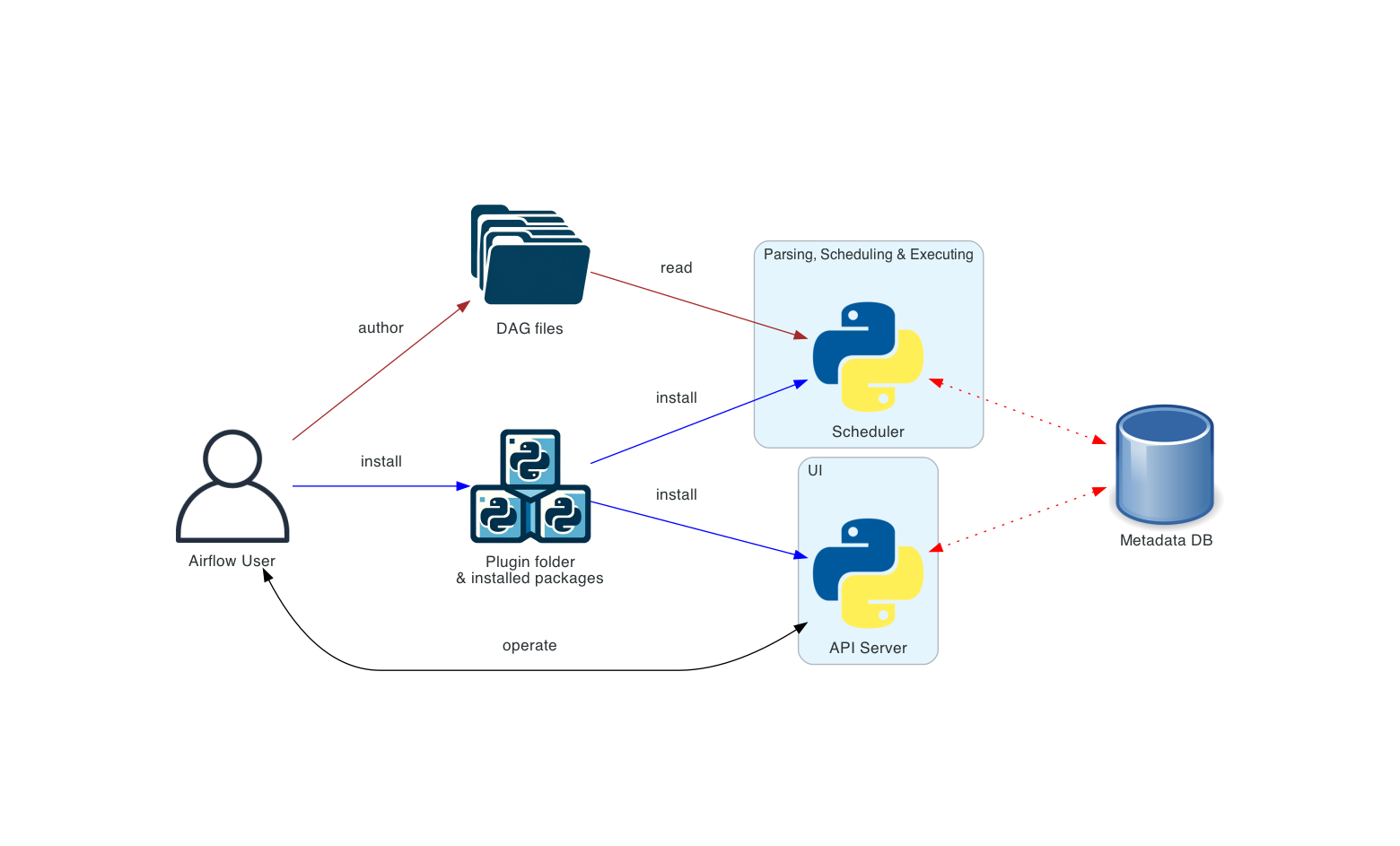
The Executor-vs-Worker distinction gets tested directly. Executor = the strategy. Worker = the muscle.
Task lifecycle
The order that matters: scheduled → queued → running.
- queued = the task has been handed to the executor but is waiting for a free worker slot.
- running = a worker picked it up and it's executing now.
Why a new DAG isn't showing up
A few legit reasons, all worth knowing:
- The scheduler polls the DAGs folder on a ~30-second default interval. (If you see "5 minutes" as an option, it's wrong.)
- The file is listed in
.airflowignore(works like.gitignore). - As an optimization, Airflow only fully parses files whose contents include the words
airflowordag— a file missing both gets skipped.
What's not a reason: needing to restart the instance. The scheduler picks up new files on its own.
Sensors
A Sensor waits for a condition to become true (a file lands, a row appears, an API returns OK) before letting downstream tasks proceed.
The high-value details:
pokevsreschedulemode. Inpokemode the sensor holds a worker slot the whole time it waits. Inreschedulemode it releases the slot between checks. Rule: ifpoke_interval> 5 minutes, userescheduleso you're not wasting a worker sitting idle.poke_intervalis in seconds.poke_interval=30means 30 seconds, not 30 minutes. Want 30 minutes? That's1800.- Default
timeoutis 7 days. Long enough that you'll usually want to override it.
XComs
XComs (cross-communications) let tasks pass small bits of data to each other via the metadata DB.
xcom_pushstores a value;xcom_pullretrieves it.- Small data only — strings, numbers, small dicts. They live in the metadata DB, so don't shove large payloads through them; use external storage (S3, GCS) for that.
- They only exist inside a DAG run / task instance context. You can't conjure one without a DAG and a task.
XComs are not the only way to share data between tasks — external storage is common and often better. That framing shows up as a trap.
Operators worth recognizing
- Transfer Operator — moves data between two systems in one task (e.g. S3 → GCS, MySQL → S3).
- Sensor Operator — waits for a condition (see above).
- PythonOperator /
@task— runs arbitrary Python.
Variables & Connections
Variables are small key-value config items stored in the metadata DB. Their purpose: avoid hardcoding and reuse a value across multiple DAGs. Not for large data, not a replacement for XComs.
Two details that get tested:
- Auto-masking. If a variable's name contains a sensitive keyword (
api_key,password,secret,token...), its value is hidden in the UI. Soairtable_api_key→ masked. - JSON deserialization. To get a JSON variable back as a Python dict:
Variable.get('my_json', deserialize_json=True). Without that flag you get a plain string.
Connections can be created three ways: the UI, the CLI (airflow connections add), and environment variables (AIRFLOW_CONN_<CONN_ID>). Not via XComs.
The CLI commands to know cold
airflow db migrate— creates/upgrades the metadata DB schema. (Replaced the oldairflow db init.)airflow tasks test— runs a single task in isolation: no dependency checks, no state written to the DB. The go-to for quick debugging.airflow dags test— runs the whole DAG without recording state.airflow dags backfill— runs a DAG over a historical range, including dates beforestart_date. This is the answer when you need to process data from before the start date.airflow info— dumps environment details including the Python version, Airflow version, and OS.
The UI views — match the view to the question
This is pure pattern-matching once you know what each view is for:
- Graph view — see the dependency structure of a DAG (the flowchart).
- Grid view — overview of all runs of one DAG with the state of every task in each run. Best for run history at a glance.
- DAGs view — the top-level list of all DAGs. No per-task detail.
- Gantt view — task durations and overlaps, for spotting bottlenecks.
- Landing Times view — how long tasks take to complete relative to schedule, for trend analysis.
Where Airflow fits (the "is this the right tool" question)
Airflow is an orchestrator, not a database, not a BI tool, and not something you embed in a product. The textbook use case: schedule and coordinate a data pipeline that ingests/transforms data into a warehouse, which something else (Tableau, Looker, etc.) then builds a dashboard on. If an option says "build the dashboard in Airflow" or "use Airflow as the product's database," it's wrong.
TL;DR cheat sheet
- Runs fire at the end of the interval;
logical_date= start of the interval. - catchup → count completed intervals, not dates.
schedule: cron / presets /timedelta. Fixed time → cron. Relative gap → timedelta.@dagand@taskare factories — call them, with parentheses.- Executor = how/where. Worker = actually runs it.
- Lifecycle: scheduled → queued → running.
- New DAG missing? ~30s poll,
.airflowignore, or noairflow/dagkeyword. - Sensor:
poke_intervalin seconds, default timeout 7 days,> 5 min→ reschedule. - XComs = small data via metadata DB. push/pull.
- Sensitive-named variables get masked; JSON → use
deserialize_json=True. - Connections: UI, CLI, env vars.
tasks test= isolated, no deps, no state.backfill= before start_date.- Match the UI view to the job: Graph (deps), Grid (run history + states), Gantt (timing).
That's the core of it. Understand these mechanics rather than memorizing answers and you'll walk in comfortable. Good luck — go get the badge. 🚀